How to Choose the Right OBD2 Scanner
A Practical Guide to Car Diagnostics and Everyday Use

The Check Engine Light comes on two days before a long drive. The car feels normal and nothing seems wrong, but the light is there and it will not go away. You can ignore it and hope for the best, or you can book a shop visit and pay for a diagnosis before anyone touches a wrench. This is the moment when many owners first wonder whether an OBD2 scanner is worth having.
An OBD2 scanner connects to the diagnostic port under the dashboard and reads what the car’s computer has recorded. In the simplest case that means a trouble code you can look up in seconds. Knowing the code does not fix the car, but it changes the conversation. You can tell a loose gas cap from a failing sensor, you can judge whether a problem is urgent, and you can walk into a repair shop knowing what to ask. Most drivers do not need a professional diagnostic machine for any of that.
Still, the tools sold under this label differ a lot. A basic code reader shows a code and clears it. A more capable scanner adds live data, freeze frame information, emissions readiness checks, and in some cases access to systems beyond the engine. Some are handhelds with their own screen. Others are small Bluetooth adapters that depend on a phone. The right one depends on how you actually use your vehicle, how much you want to learn, and how far you plan to go with your own repairs.
Four things separate one scanner from another: how much of the vehicle it can talk to, how easy it is to use, how well it presents live data, and how it connects. Advanced functions sit on top of those. They are useful for the right owner and a distraction for everyone else.
Our Take
Start with the question of what you want the scanner to tell you. A large share of everyday problems show up as engine and emissions codes. Misfires, oxygen sensor faults, evaporative leaks, and catalytic converter efficiency all live in that territory, and every car sold in the United States for decades has been required to report them in a standard way. If this is the kind of problem you expect to face, a simple wired code reader is often enough. It lives in the glove box and works without a phone, a login, or an update.
The picture changes when the warning is not about the engine. An ABS light, an airbag light, or a transmission fault is stored in a different control module, and a basic reader usually cannot see it. A scanner with enhanced diagnostics can reach some of those modules on supported vehicles. The words supported vehicles matter. OBD2 compliance only guarantees the standard engine and emissions layer. Access to ABS, SRS, transmission, or tire pressure data depends on the scanner and on the make, model, and model year. Two scanners that both say OBD2 on the box can behave very differently on the same car.
That leads to the difference between basic and deeper diagnostics. Standard OBD2 data is generic by design. Manufacturer specific data is where the detail is, and it is also where cost and complexity rise. Bidirectional scanners can command components to move or test, which is valuable in a workshop and rarely necessary for a driver who wants to know why a light is on. Service resets and similar functions are handy for some owners and irrelevant for others. Paying for features you will never open is a common mistake.
Live data deserves its own attention. Seeing coolant temperature, engine speed, and sensor readings in real time turns a scanner from a code lookup tool into a way to watch how the engine behaves. If you are chasing a rough idle or an intermittent fault, that view is what lets you compare a suspect reading with a normal one. If you only want to know what the light means, live data may never matter. A scanner that presents it clearly is still a good thing to have, because curiosity tends to grow once you own the tool.
Connectivity is the next decision. A phone based scanner is small, often cheaper to carry, and can use a large screen you already own. It also lets the app explain codes, store history, and in some cases add repair information. The cost is dependence. You need the phone, the app, and a working Bluetooth pairing at the exact moment you are standing next to a car with a problem. App updates can change how things work, and some apps put features behind a subscription. A dedicated handheld with a built in screen avoids all of that. It is less elegant but always ready, and many people value that more than they expect. Think about where you will use it. If the car lives in a driveway with your phone in your pocket, the app route is easy. If you are checking a vehicle on the roadside, a handheld is simpler.
Subscriptions need honest treatment. Some scanners work fully without recurring fees. Others offer a free core function and an optional paid tier for added features. That model is not a problem when the free part does what you need. It becomes a problem when you realize later that the feature you wanted sits behind the paywall. Read what is included before you buy and decide whether the paid extras are something you would use.
A scanner also does not replace ordinary care. A code can point toward a failing sensor, but a car that is overdue for service will keep producing problems that no scanner can prevent. Fresh oil filters and regular oil changes remain basic habits, and a scanner is best seen as a partner to that routine rather than a substitute for it.
The practical rule is simple. A modest scanner serves the owner who sees a warning once in a while. A broader tool serves the person who wants to understand more systems, work on their own car, or avoid paying for diagnosis time. Neither choice is wrong. The mistake is buying more or less than the way you drive and maintain your car calls for.
ANCEL AD310 Classic Enhanced Universal OBD II Scanner

- CEL Doctor: The ANCEL AD310 is one of the best-selling OBD II scanners on the market and is recommended by Scotty Kilmer…
- Sturdy and Compact: Equipped with a 2.5 foot cable made of very thick, flexible insulation. It is important to have a st…
- Accurate Fast and Easy to Use: The AD310 scanner can help you or your mechanic understand if your car is in good conditi…
Some tools earn their place by doing very little and doing it without fuss. The ANCEL AD310 is a wired handheld with a 2.4 inch display. You plug it into the OBD2 port, it powers up from the vehicle, and you read the screen. There is no charger and no app, and nothing to pair. For many owners that is the whole appeal.
It reads and clears engine related trouble codes, shows live data, and offers freeze frame information that captures conditions when a fault was stored. It also includes I/M readiness testing, which helps you see whether the emissions monitors have completed before an inspection. A built in code library lets you read a description of the code right on the device, and the scanner supports the major OBD2 protocols including CAN. Vehicle information is available as well.
The strongest practical advantage is how little it asks of you. Picture a driver who sees a warning light on the way to work. The scanner lives in the glove box. Five minutes in the driveway later, the code is on the screen and the owner can decide whether it is a loose gas cap or something worth taking to a shop. That scenario covers a great deal of real ownership, and this style of tool handles it well.
The limit is just as plain. This is a basic engine and emissions scanner and it does not offer ABS or SRS diagnostics. It also does not provide bidirectional controls. If an airbag light or an ABS warning appears, this tool will not reach those modules. It is not professional equipment and it should not be treated as one. A small screen with limited navigation also means long lists of live data are less comfortable to work through than on a phone or a larger display.
Compared with the other tools here, it is the most straightforward. It does not have a phone interface like FIXD or BlueDriver, and it does not lean on third party software like Veepeak. Someone who wants repair guidance, maintenance tracking, or access to systems beyond the engine should look elsewhere. Someone who wants a dependable cable tool for the occasional warning light will find it a sensible fit.
FIXD Bluetooth OBD2 Scanner
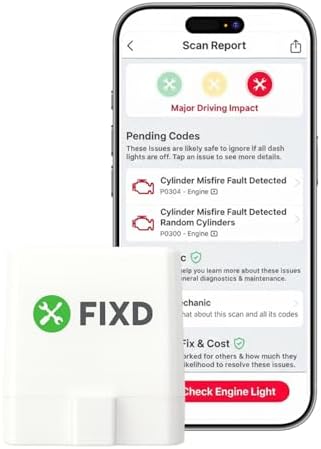
- Easily Diagnose Car and Truck Issues from Your Phone – Scan and identify 39,000+ issues across thousands of vehicles, fr…
- Free App with Unlimited Scans – Get simple explanations of your car’s issues instead of confusing error codes. Get alert…
- Manage All Your Cars in One App – Save scans by vehicle, track mileage-based reminders, and share results with family or…
FIXD is built for the driver who does not want to learn scanner menus. The hardware is a small Bluetooth adapter that plugs into the OBD2 port, and nearly everything else happens in a smartphone app on iPhone or Android. The idea is to take diagnostic information that looks technical and explain it in plain language.
That choice matters. A raw code such as a misfire designation means little to many owners. When an app describes what the problem is, how serious it tends to be, and what it may involve, the information becomes easier to act on. FIXD can read and clear supported check engine codes and provides live vehicle data. For a person who just wants to understand a warning before talking to a mechanic, that translation is the main value.
The app also adds things a plain code reader does not. Maintenance tracking helps you keep up with routine service, and it can monitor more than one vehicle, which suits households with several cars. Compatibility covers gas vehicles from 1996 onward and diesel vehicles from 2008 onward according to the Amazon listing, so it is worth confirming your vehicle falls inside those years.
The honest downside is that the experience lives inside the app. You need your phone with you, the app installed, and a working connection to the adapter. If the app changes or your phone is not nearby, the scanner is less useful. There is also an optional FIXD Premium tier with additional features. It is not required for the basic diagnostic functions, so a driver can use the product without paying beyond the purchase. Decide whether the extras appeal before you assume you need them.
It is also important to be realistic about scope. FIXD is aimed at check engine codes and simple guidance. It is not meant to provide every professional diagnostic function and it is not the right pick for someone who wants deep access to other vehicle systems or detailed repair data. Compared with BlueDriver, it is simpler and more guided. Compared with the ANCEL, it trades a handheld screen for a friendlier interface and maintenance reminders. Drivers who like to dig into data will probably outgrow it, while those who want clarity first will likely appreciate it.
BlueDriver Bluetooth Pro OBDII Scan Tool

- [Diagnose Like a Pro] BlueDriver Pro is a professional OBD2 scanner and diagnostic tool that helps you scan, understand,…
- [Read and Clear More Codes Than Ever] Read and clear more codes than basic car code readers. Access enhanced diagnostics…
- [Verified Fixes and Real-Time Data] Get unlimited, technician-verified repair reports matched to your VIN, with definiti…
BlueDriver is the most capable phone based option in this group. The LSB2 adapter connects by Bluetooth to an iOS or Android app, and the core product carries no subscription fee. That alone sets it apart from some app driven tools, because the features you buy at the start are the ones you keep.
Its reach goes beyond engine codes. It reads and clears Check Engine codes, and on supported vehicles it can also access enhanced diagnostics including ABS, SRS and airbag, transmission, and TPMS information. It provides live data, freeze frame information, smog readiness checks, Mode 6 data, and vehicle information. Support is broad across North American vehicles, but the enhanced functions vary by make and model. A car that shows ABS data on one brand may not show it on another, so the coverage you get depends on your own vehicle.
What makes BlueDriver more than a feature list is the Repair Reports. When the app reads a code on a specific vehicle, it can present possible causes and fixes that have been reported for that vehicle. A raw code tells you what failed in a general sense. A report tied to your make and model tells you where people have actually found the problem. For a DIY owner that can shorten the guesswork considerably, and for someone heading to a shop it makes the conversation much easier.
Enhanced diagnostics also change how you can respond to a warning. If a brake related light comes on, seeing whether the ABS module has stored a fault helps you separate a sensor issue from a worn component. The scanner can identify the fault, but the repair still involves the parts themselves, such as brake pads when wear is the cause. Knowing which one you are dealing with saves money and time.
The tradeoff is dependence on the phone and the app. Everything runs through that pairing, so battery life, app behavior, and wireless connection all matter. It is also not a replacement for a professional workshop diagnostic system. Shops use equipment with broader coverage and deeper controls. Within the smartphone category BlueDriver goes further than FIXD and gives you more data than the cable scanners, at the cost of a slightly more involved experience. It suits owners who want real insight into their car without moving up to expensive tools.
MOTOPOWER MP69033

- Multi-Functions – Practical Multi-Functions OBD2 code reader features built-in OBD2 DTC lookup library, which help you t…
- Wide Capability – Supports 9 protocols compatible with most 1996 US-Based, 2000 EU-Based and Asian cars, and newer OBD I…
- 2.8″ LCD Display – Designed with a clear display 2.8″ Large LCD screen – white backlight and contrast adjustment. No nee…
The MOTOPOWER MP69033 sits in the traditional corner of the market. It is a wired handheld that gets its power from the OBD2 port, with no app, no WiFi, and no pairing. The screen is listed at roughly 2.7 to 2.8 inches depending on the Amazon specification, a little larger than the ANCEL, which makes live data easier to read.
It reads and clears engine fault codes and includes a built in lookup library. Freeze frame data, I/M readiness, and vehicle information are there too. The live data section shows items such as vehicle speed, engine coolant temperature, and engine speed in real time, and it supports the major OBD2 protocols. Multiple interface languages are available as well.
Its best use is in a home garage. Imagine an owner with a car that idles roughly. With a cable tool and a readable screen, they can plug in, start the engine, and watch the numbers while adjusting or inspecting something. No phone is required and nothing needs to be charged. For a person who wants more information than a bare code reader but does not want a wireless setup, that combination is practical.
The limits are clear. This remains focused on engine and OBD2 functions. It does not support ABS or airbag systems and it does not provide broader diagnostics beyond the standard layer. A driver who needs access to other modules will not find it here. Screen size is better than the ANCEL but still small, so scrolling through long data lists takes patience.
Note that this article covers the original MOTOPOWER MP69033 with ASIN B07Z3HB7DR, not the newer Pro listing. In relation to the other tools, it is a step up in readability from the ANCEL and a simpler, more self contained alternative to the phone tools. Someone who wants repair reports, maintenance tracking, or enhanced systems should look to BlueDriver or a similar tool. Someone who wants a durable cable scanner to keep in the garage will find it fits the job.
Veepeak OBDCheck BLE Bluetooth OBD II Scanner

- NOTE: It requires a compatible third-party app and is designed primarily for standard OBD-II diagnostics. It is not a fu…
- STANDARD OBD-II FUNCTIONS – read & clear trouble codes for check engine light, view freeze frame data, I/M readiness, an…
- VEHICLE COMPATIBILITY – Works with most 1996+ cars and light trucks in the US for standard OBD-II diagnostics functions….
The Veepeak OBDCheck BLE is different in kind from the others. It is a compact Bluetooth adapter that works with iOS and Android, but it does not come with a single built in app experience. Instead it connects to third party OBD2 applications. Veepeak lists apps such as OBD Fusion, Torque Pro on supported Android devices, and Car Scanner, along with other compatible software.
That makes the comparison with BlueDriver instructive. BlueDriver sells a complete ecosystem where the adapter and app are designed together, with repair reports and enhanced functions inside. Veepeak sells the adapter and leaves the software choice to you. The upside is flexibility. You can pick the app whose layout you like, try several, and change your mind later. Some apps offer custom dashboards and fuel economy information, which appeals to people who enjoy watching their car’s data.
The adapter reads diagnostic trouble codes, clears supported codes, and provides freeze frame data, live sensor data, and I/M readiness. It is designed for OBD2 and EOBD compliant vehicles and has low power consumption, which matters for a device that stays plugged in.
The drawback is the other side of that freedom. What you can actually do depends on the app you choose. Different applications offer different features, and not all of them are free. Some functions may require a paid version of the software, and no app should be assumed to match another. If you want a ready made experience with guidance built in, this approach will feel less direct. You are the one assembling the setup.
It suits the tinkerer who is comfortable testing apps and wants a small adapter rather than a closed system. It is a poor fit for the driver who wants to plug in and be told what to do, where FIXD or BlueDriver is more natural, and for the owner who wants no phone involved at all, where a handheld such as the ANCEL or MOTOPOWER makes more sense.
Choosing for the Way You Drive
Think about the last time a warning light appeared. If it happens once in a while and you mostly want to know whether to worry, a simple tool you can leave in the glove box is enough. The ANCEL covers that cleanly, and the MOTOPOWER does the same with a bigger screen and a clearer view of live data. Both work without a phone, which is a quiet advantage when you are in a parking lot with a dead battery on your mind.
If you want to understand a warning before visiting a repair shop, the more useful question is how much explanation you want. FIXD gives plain language guidance and reminders. BlueDriver gives you detailed, vehicle specific reports on possible causes. Either lets you arrive with some knowledge rather than a vague worry, and that alone can change how a service conversation goes.
For the DIY owner who likes watching live data, the best fit depends on temperament. A handheld works if you prefer a dedicated screen and no wireless steps. A phone based tool works if you like a larger display and saved history. Veepeak suits the person who enjoys choosing software and building a setup. Just remember that its usefulness depends on the app you pair it with.
Anyone who wants ABS or SRS information needs to be more careful. Among these five, BlueDriver is the one built to reach those systems, and even then only on supported vehicles. Before you buy for that reason, check that your make and model are covered. The same applies to transmission and tire pressure data.
What matters most is the level of information you will actually use. Buying a bigger tool does not make you a better diagnostician, and buying a smaller one does not leave you helpless. A scanner is a way to turn a mysterious light into a specific question. Once you have the code, you can decide whether to tighten a cap, replace a part, or hand the car to someone with more equipment. Choose the one that matches how you drive and how far you want to go with your own car, and it will do its job for years.